Just like a leaky faucet, after a while you get accustomed to the constant drip, drip, drip and forget it’s there. Even before the release of Windows 7 we were all aware that work was underway for Windows 8. There were rumblings and leaks of a possible 128 bit Windows 8 and certainly a 128 bit Windows 9 even when Windows 7 64 bit had barely hit the streets.
To be sure no one forgets, another leak has popped out, again suggesting, that Windows 8 will be released in 2 years. That would match the original leak of last year and serve to get Windows back in the news. You can read the cnet article here.
For the past 7 years Microsoft has released security patches for their products on the second Tuesday of each month. Following tradition, Microsoft just issued its largest security patch ever on October 12th, Patch Tuesday. Let me say again that this is the largest patch ever from Microsoft. A total of 49 vulnerabilities are fixed with 16 patches and this far exceeds the previous record of 34.
One of the most notorious exploits, that was mostly fixed, was the Stuxnet virus. This is the virus that attacked the Bushehr nuclear power plant in Iran earlier this year. I think it was a mistake when we coined the word “virus” to describe these attacks. We forget that what we call a virus is a direct attack by an individual or group. It’s almost as if we accept virus activity like we would accept having a cold. Make no mistake, this virus is not about a few stolen credit card numbers. There is a war going on. There are good guys and bad guys. The good guys are called “White Hat Hackers”, the bad guys are called “Black Hat Hackers”, and they are locked in mortal combat.
The introduction of the Stuxnet Virus changed the game. It amazed and horrified all the current experts. The attack on Bushehr was and still is, a big deal. The Stuxnet virus attacked a physical plant, and a nuclear plant at that. No longer a simple attack on software but a full blown attack on hard objects.
Ubuntu 10.01 (Correction .04) may be the replacement you are looking for
™With word circling about the confusion on Windows™ 7 OEM end user license, some may be desiring to go with Windows™ XP. Though you may be allowed another chance at their “downgrade” rights.
There may, however, be another replacement that you hadn’t considered. And it is free.
I recently purchased a new MSI motherboard and had some other computer components laying about.
Ubuntu now has Version 10.04 on their web site available for download. Unless you have a solid connection, I recommend obtaining a copy from one of their outlets. The disks run about $4.99 and most have free shipping.
A Little History
I was impressed with Ubunutu until about version 8. I was able to restore older computers to usefulness, but then Ubuntu started getting too demanding for older machines.
I do not know how 10 will work on older machines. I haven’t tried it. Since I had the dual-core board and was waiting for parts, I decided to test it.
Installing
Ubuntu has narrowed the questions for installing to about six questions. Unlike Windows™, you do not have to have an internet connection, because you do not have to go through the Windows™ permission slip process. However, to upgrade and get the system working to par, you will.
I pieced together a test machine with the parts I had lying around. I tried to install Ubuntu and got an error message. I was frustrated, but I did make two copies of the ISO that I downloaded, so I tried the second. It installed fine.
The first thing that I noticed was the wireless in the top panel. I needed that to connect to the Internet, but it wasn’t connecting. I checked the hardware and it did recognize my cheap RelTek 8185 based wireless card. I was used to the other OS informing me with that annoying little cartoon balloon that there were wireless connections available.
I suddenly realized another advantage of Ubuntu. It does NOT keep giving you annoying balloons telling you that it demands that you do things. Aha! One more advantage to Ubuntu!
I clicked on the wireless icon and got the menu. There I found the wireless connections available. I selected one, entered the code and voila! I was connected.
The second problem that I encountered was the video player included with Ubuntu. It would not play DVDs. It gave me an error message and, after following the links, I found that they cannot include certain packages in the initial install due to legalities. You have to download and install those packages. After doing so, video DVDs played just fine.
Another advantage to Ubuntu is that there are a myriad of software packages that you can install for free. Simply click on Applications and go down to the last item on the menu to install.
There is a Synaptic package install that you get to through the Administration section, but I cannot remember the exact procedure to get to it. I do not have Ububuntu up right now, but you can find it. You can re-install packages and add other programs not available through the other Ubuntu install.
One thing to remember is that you get what you pay for. For support, you may have to dig for hours through support sites to find your answers. If you are good at search engines and can apply just the right keywords, you may find what you need with the first shot.
I recommend trying it by itself and not installing it on your Windows™ machine right away. It takes some getting used to, but once you get the hang of it, you might find it useful to have at least one separate Ubuntu machine available for use.
They do have antivirus software available, but generally Linux machines are attacked less than the other OS. Corporate machines using Linux are attacked, so if you are using it for business, make sure you understand the security before putting it online for your business.
Linux is OpenSource, so there are thousands of developers around the world looking to close any loopholes left open. There are some, but Linux has less open areas than the other OS.
There are hundreds of Linux distros out there besides Ubuntu. Ubuntu is Debian-based and the easiest that I have found to work with when switching from Windows.
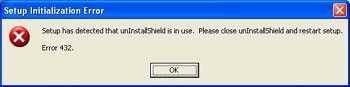
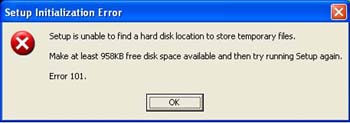
Error 432 and 101
Please Note: Author is not responsible for damage to your computer from the use or misuse of the information contained in this article.
As you know, Windows XP has to be restored, from time-to-time, because, well… It blows. The update service at Microsoft adds stuff that seems to burden the system. If you install a program, it generally does not clean itself out of the registry. Shareware and freeware programs are especially sinister in this. And, of course, spyware and viruses are rampant.
But this time, it was not their fault. It was mine. I tried a development program on two computers and two got wrecked. I was able to continue using this one, so I did not worry too much about it.
Then came the day when I had to worry too much about it.
I reinstall programs as I need them, so when it came time for Adobe Photoshop Essentials, I received the following error:
DataViz sent me to to the Flexera Software support site. I found, through my research, that I had to find isuninstall.exe or uninstall.exe in the Windows directory and delete them. Which I did. The program started to install until I received the following error:
With some research I found that I some attributed it to Microsoft Antivirus. Since I do not run Microsoft Antivirus, I promptly turned to CA Antivirus, which I have installed. I disconnected from the web, and “snoozed” the antivirus program as well as the spyware program.
The program went through fine.
The only problem was that when I went to install Windows, I somehow installed it over the drive containing my graphics. Need I say backup?